

One line to install every OT Fabric tool, for people and for pipelines
Every OT Fabric command-line tool, from modbusctl and iec104ctl to otprobe and mbcapctl, now installs with one line from get.otfabric.io. And because every tool now shares JSON output, exit codes and version reporting, the same tools run in CI/CD pipelines, scripts and Docker images.
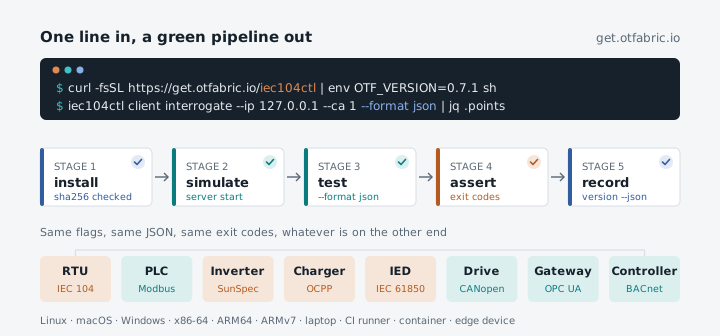
A field tool is only useful once it is on the machine where you need it. That machine is rarely a developer’s laptop. It is a commissioning laptop in a substation, a jump host in a plant network, a Raspberry Pi in a cabinet, a CI runner that tests a gateway every night, or a container image that a test bench starts on demand.
Until now, getting an OT Fabric tool onto any of those meant a block of shell: find the latest release, pick the right archive for the CPU, download it with its checksum file, verify, extract and install. Every protocol’s documentation carried its own copy of that script. Today it is one line:
curl -fsSL https://get.otfabric.io/iec104ctl | shOn Windows:
irm https://get.otfabric.io/iec104ctl.ps1 | iexReplace iec104ctl with any of the 24 tools on get.otfabric.io, and run the same line again to upgrade.
Every tool, including the ones inside a library
The one-liner covers the command-line tools with a repository of their own, one for each protocol: modbusctl, opcuactl, bacnetctl, iec104ctl, iec61850ctl, s7commctl, dnp3ctl, ocppctl, openadrctl, ieee20305ctl, ethernetipctl, profinetctl, canbusctl, canopenctl, knxctl, sparkplugbctl and sunspecctl.
It also covers the helper tools that ship inside a protocol library’s repository, which used to be the hardest to get: otprobe from go-otfp, mbcapctl from go-modbus-capture, mbtracectl from go-modbus-trace, modbus-cli from go-modbus, sclparse and sclgen from go-iec61850, and nsdctl from go-iec61850-model. Several of them are nested modules that go install cannot build, so the only way in used to be a manual download or a checkout. Now they install like everything else, and their version is the version of the library they ship with.
What the line does
The installer is small, readable and the same for every tool. It detects the platform (Linux on x86-64, ARM64 and ARMv7, macOS on Intel and Apple silicon, Windows on x86-64 and ARM64), resolves the version once, and downloads that release’s archive together with its SHA-256 checksums file. It refuses to install when the checksum is missing or does not match. It extracts only the expected binary, runs <tool> version as a smoke test, and only then replaces an installed copy. It installs per user, in ~/.local/bin or %LOCALAPPDATA%\OTFabric\bin, without sudo.
Two options change it from a human installer into a machine one:
# The exact release you tested, every timecurl -fsSL https://get.otfabric.io/iec104ctl | env OTF_VERSION=0.7.1 sh
# A fixed directory for CI, containers and device images: no PATH or profile changescurl -fsSL https://get.otfabric.io/iec104ctl | env OTF_UNMANAGED_INSTALL=/usr/local/bin sh
The installer exits 0, 1 or 2, so a pipeline stops at the install step instead of failing three steps later. The tools are static binaries with no runtime to install first, which is why the same line works on a 32-bit ARM edge box and on a Windows engineering workstation.
Friendly to people
The tools are built for the engineer at the terminal first. Output is readable text or an aligned table by default. Flags and values complete in bash, zsh, fish and PowerShell. Commands that change a device ask for an explicit --yes, --dangerous or a select-before-operate sequence, and the bus tools are passive until you tell them otherwise. Most tools can also play the other side of the protocol, so iec104ctl server start, dnp3ctl server start, bacnetctl server run or opcuactl serve give you something to talk to before you connect to anything that matters.
Friendly to pipelines
Over the past weeks every tool was aligned on the same contract for machines. A script that drives one protocol now carries over to the next.
JSON on request. --format json, or <TOOL>_FORMAT=json for a whole job. A one-shot command writes one JSON document; a stream such as a monitor or a simulated server writes JSON Lines. Field names are snake_case and documented per tool, and changes to them are called out in the release notes.
Clean streams. The result goes to stdout and nothing else. Progress, connection state and debug traces go to stderr. A failure under --format json is one object, {"error": {"kind", "code", "message"}}, with a stable code for machines.
One exit-code table. 0 success, 2 usage, 3 invalid input, 4 no connection, 5 timeout, 6 the device refused or broke the protocol, 7 partial success, 10 output or internal error, 130 interrupted, and 1, 8 and 9 for findings, unsupported and permission. A code means the same thing in every tool, so a wrapper can tell “the RTU did not answer” from “the RTU said no” without knowing the protocol.
Aligned version reporting. <tool> version --json prints the same keys everywhere, including the OT Fabric protocol stacks inside the binary:
{"name":"canopenctl","version":"0.6.0","tag":"v0.6.0","commit":"1802d0f9afe8642d1e278120b76fcdfac967cb9e","built":"2026-11-05T15:41:49Z","libraries":[{"name":"go-canbus","version":"0.8.0"},{"name":"go-canopen","version":"0.4.1"},{"name":"go-serial","version":"0.2.1"}],"go":"go1.26.0","platform":"linux/amd64"}That line belongs in every test report. When a result changes between two runs, it tells you whether the tool, the protocol stack or the device changed.
In a CI pipeline
Put together, a nightly test of a SCADA front end or a protocol gateway needs no hardware and no hand-written glue:
- name: Install iec104ctl run: | curl -fsSL https://get.otfabric.io/iec104ctl \ | env OTF_VERSION=0.7.1 OTF_UNMANAGED_INSTALL="$RUNNER_TEMP/bin" sh echo "$RUNNER_TEMP/bin" >> "$GITHUB_PATH"- name: Simulated station run: iec104ctl server start --listen 127.0.0.1 --duration 300 &- name: Interrogate it run: | sleep 1 iec104ctl client interrogate --ip 127.0.0.1 --ca 1 --format json > station.json iec104ctl version --json > tool-version.jsonThe step fails on its own when the station does not answer (exit 4 or 5) or refuses the request (exit 6), and station.json and tool-version.json go into the build artifacts. Swap in dnp3ctl, ocppctl or bacnetctl and the shape of the job stays the same. Where a test needs independent implementations rather than our own, the interop suites run reference stacks in containers next to it.
In a container
The same line is the whole install step of a Dockerfile:
FROM debian:bookworm-slimRUN apt-get update \ && apt-get install -y --no-install-recommends ca-certificates curl \ && curl -fsSL https://get.otfabric.io/iec104ctl \ | env OTF_VERSION=0.7.1 OTF_UNMANAGED_INSTALL=/usr/local/bin sh \ && rm -rf /var/lib/apt/lists/*ENTRYPOINT ["iec104ctl"]That gives a test bench, a Kubernetes job or a jump host a pinned, checksum-verified tool in one layer.
Get started
Install the tools has every option, the requirements and the full list of tools. Scripts, CI and containers covers the JSON contract, the exit codes and complete GitHub Actions, GitLab CI and Dockerfile examples. Every tool’s project page, such as iec104ctl, now shows its install line, the first commands to try and how it behaves in automation. The installer and all the tools are MIT-licensed. Security issues go to security@otfabric.io.