

LAN Tracker: a memory for your OT network
Network problems are one of the top causes of OT downtime, and most leave no trace. LAN Tracker keeps an evidence-based history of which device held which IP, what DHCP told it and which ports answered, so you can reconstruct an incident after the fact.
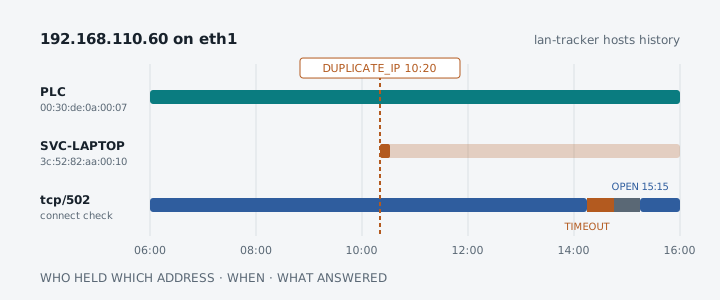
Ask anyone who keeps a plant, a substation or a solar park running what takes their systems down, and the network comes up fast. Not the dramatic failures, but the quiet ones: a duplicate IP address, a laptop that brought its own DHCP server, a device that renewed its lease and came back on a different address, a port that stopped answering for an hour and then recovered on its own.
By the time someone looks, the evidence is gone. The SCADA log says the inverter was unreachable from 14:15 to 15:15. It does not say why. Switch tables have aged out, the service laptop has left the site, and nobody captured packets because nobody knew there would be a problem.
That is the gap LAN Tracker fills. It is a small daemon that sits on a Linux edge device and keeps a history of what is connected to your OT networks, so that afterwards you can ask what happened and get an answer backed by evidence.
Questions it answers
- Which device had 192.168.110.51 yesterday at 10:15, and where did it go?
- Since when do two devices claim the same IP address?
- Which DHCP server gave this PLC its address, with which gateway and DNS servers?
- When did port 502 on this inverter stop answering, and when did it last answer?
- Was the tracker itself running during the incident?
An incident, reconstructed
“The inverter dropped off the SCADA around 14:15 yesterday. What happened?” Start with the warnings:
sudo lan-tracker events list --type duplicate-ip,dhcp-server-unexpectedTIME TYPE IFACE MAC VALUE RELATED CAUSE2026-10-16 09:30:00 DHCP_SERVER_UNEXPECTED eth1 00:50:56:c0:00:08 10.0.0.1 - passive_dhcp_server2026-10-16 10:20:00 DUPLICATE_IP_DETECTED eth1 3c:52:82:aa:00:10 192.168.110.60 00:30:de:0a:00:07 passive_arpAt 09:30 a service laptop joined the network, and a DHCP server that was not on the allowlist answered its request: a virtual machine on the laptop. At 10:20 the laptop claimed the inverter’s address with a gratuitous ARP. Who held the address at the moment things broke?
sudo lan-tracker hosts find 192.168.110.60 --at "2026-10-16 10:30"MAC: 00:30:de:0a:00:07 (OUI registrant: WAGO Kontakttechnik GmbH)Binding: 192.168.110.60 2026-10-16 06:00:13 → open sources: passive_ipv4, tcp_connect CONFLICTConflict: 2026-10-16 10:20:00 DUPLICATE_IP_DETECTED 192.168.110.60 between 3c:52:82:aa:00:10 and 00:30:de:0a:00:07
MAC: 3c:52:82:aa:00:10 (OUI registrant: Hewlett Packard)Name: SVC-LAPTOPBinding: 192.168.110.60 2026-10-16 10:20:00 → open sources: passive_arp CONFLICTAnd hosts history 192.168.110.60 shows the TCP check on port 502 timing out at 14:15, refused from 14:45, and open again at 15:15. The whole story, from three commands, a day later, with the evidence behind every line. The CAUSE column says what each event rests on: an ARP frame, an IPv4 packet, a DHCP server’s reply or a TCP connect.
Passive first, and safe when active
OT equipment does not always tolerate unexpected traffic, so LAN Tracker listens by default and sends nothing. It learns from ARP, DHCP, mDNS, DNS answers, LLDP, the IPv4 source addresses it sees and the kernel’s own neighbour table. On a switched port that is its own traffic plus broadcast and multicast; on a mirror port, everything.
Active discovery is there when you want it, but only per interface, only for networks you list, and only inside a strict safety envelope:
- ARP sweeps, ping and plain TCP connects that send no payload. No SYN scans, no UDP port scans, no banner grabbing.
- Every probe takes a slot from a budget: by default 5 probe starts per second in total, 1 TCP connect per second, and at least 5 seconds between probes to the same device.
- Excluded addresses are never touched.
lan-tracker scan planpreviews exactly what a scan will send and how long it will take, before anything goes on the wire.lan-tracker active disable --reason "PLC firmware update"stops all probing at once, and stays set across restarts.
DHCP, in depth
DHCP problems are some of the hardest to see and the easiest to cause. LAN Tracker decodes every DHCPv4 message it sees and keeps:
- the servers and relays that answer, checked against an optional allowlist per interface, so a rogue server raises
DHCP_SERVER_UNEXPECTED; - each client’s exchanges, with the offers it received, the one it chose and the outcome;
- a lease history per client, with the router, DNS servers, domain and search list it was handed, and an event whenever that configuration changes.
Built for the edge
LAN Tracker is one static binary for amd64 and arm64, run by systemd on a Raspberry Pi CM4, a RevPi Connect or an x86 edge box. It holds only the CAP_NET_RAW capability and keeps its history in a local database with a fixed size budget: raw observations for 7 days, hourly summaries for 90 days and events for 2 years, so an incident can be explained long after the raw data is gone.
Nothing leaves the box. You work with it through the CLI, a REST API on a Unix socket and optional Prometheus metrics on loopback. Every event also goes to the systemd journal, one line each, so the tools you already use keep working:
journalctl -u lan-tracker EVENT=duplicate_ip_detectedTry it
A release is one tarball per architecture with the binary, the systemd unit and a default configuration. The README has a copy-paste install that downloads, verifies and starts the latest release, and the user guide walks through real sessions: finding a device, reconstructing an incident, reading DHCP history, active discovery and the offline mode for when the daemon is down.
Like everything in OT Fabric, LAN Tracker is MIT-licensed and built by people and AI agents together, held to the same bar of public code and public tests. It is at v0.2.1 today. Field validation on real sites is the next step, so if you run it on your network, we would like to hear what it found: open an issue on GitHub.