

otprobe: which OT protocol is on that port, and which device is behind it
go-otfp v0.1.0 is a rewrite of OT Fabric's protocol fingerprinting library. It detects 14 OT protocols over TCP, UDP and TLS with safe, read-only probes, reads the device identity each protocol offers, and ships with otprobe, a command-line tool for the field.
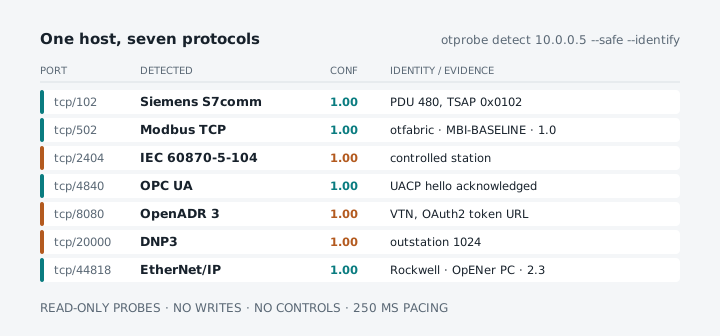
Every commissioning job and every site audit has the same moment. There is an address on a drawing, or an open port in a scan, and nobody is sure what is behind it. Port 502 is probably Modbus, but is it a SunSpec inverter? Port 102 could be a Siemens PLC or an IEC 61850 IED. And the gateway someone installed on port 5020 three years ago could be anything.
A generic port scanner cannot answer that. It sees an open TCP port and guesses a service from a list. An industrial protocol needs to be asked in its own language, and asked carefully, because the device on the other end may be running a process.
That is what go-otfp does, and today it gets a new engine, four more protocols, device identification and a command-line tool of its own: otprobe.
What it detects
go-otfp v0.1.0 recognises 14 protocols:
| Protocol | Transport | How it is detected | What identify mode reads |
|---|---|---|---|
| Modbus TCP | TCP 502 | Read Device Identification (FC 43/14) | vendor, product, version, model |
| SunSpec Modbus | TCP 502 | SunS marker, refining a Modbus match |
manufacturer, model, version, serial, model chain |
| IEC 61850 MMS | TCP 102 | COTP connect, then MMS Initiate | MMS Identify: vendor, model, revision |
| Siemens S7comm and S7comm-plus | TCP 102 | COTP connect, then S7 Setup Communication | SZL: order number, module, plant, serial |
| OPC UA | TCP 4840 | UACP Hello and Acknowledge | GetEndpoints: application name, URIs, policies |
| EtherNet/IP | TCP and UDP 44818 | ListIdentity | vendor, device type, product, revision, serial |
| BACnet/IP | UDP 47808 | ReadProperty of the Device object | vendor, model, firmware, object name |
| PROFINET IO | UDP 34964 | DCE/RPC read of I&M0 | vendor ID, order ID, serial, revisions |
| DNP3 | TCP 20000 | Data-link REQUEST_LINK_STATUS | device attributes: vendor, product, version |
| IEC 60870-5-104 | TCP 2404 | TESTFR act and con | common address, ASDU types |
| OCPP | WebSocket on 80 or 443 | Upgrade with ocpp2.1, ocpp2.0.1, ocpp1.6 |
negotiated version |
| IEEE 2030.5 | TLS 443 | Mutual-TLS and CCM_8 shape, GET /dcap |
server certificate, poll rate |
| OpenADR 3 and 2.0b | TCP 8080 or 443 | GET /auth/server and /programs, or a 2.0b registration query |
OAuth2 token URL |
| CAN over a TCP gateway | gateway port | SLCAN V and N commands |
firmware version, serial |
Detection does not trust the port number. The engine tries the protocols registered for the target’s port first and then the rest, so an OPC UA server on 4841 or a Modbus gateway on 5020 is still found.
Safe first
The probes are designed for networks that run real processes. For each protocol, go-otfp sends the standard handshake or one harmless request, and reads the reply. It never writes a value, never issues a control and never changes a device’s configuration.
Identify mode goes one step further, and still only reads: it uses each protocol’s own identification service, such as Modbus Read Device Identification, the CIP Identity object, the S7 SZL, MMS Identify, the BACnet Device object or OPC UA GetEndpoints.
For production networks there is a conservative mode. --safe sends passive probes only, tries the likely protocols of a port first and leaves 250 ms between probes, to stay below the thresholds of OT intrusion detection systems.
otprobe in the field
otprobe puts the library on the command line. Point it at one endpoint:
$ otprobe detect 10.0.0.5:44818 --identifyTarget:   tcp://10.0.0.5:44818Detected: EtherNet/IP, confidence 1.00
  EtherNet/IP  1.00  EtherNet/IP device    - ListIdentity: Rockwell Automation/Allen-Bradley, product "OpENer PC"    - session registered (handle 0x00000001)    vendor       Rockwell Automation/Allen-Bradley    vendor id    1    product      OpENer PC    version      2.3    serial       0x075BCD15    deviceType   Communications Adapter    productCode  65001    fingerprint  enip.listidentity:vendor=1;devtype=0x0c;product=65001;rev=2.3;session=ok
  1 probe in 2ms
That is real output, from the OpENer reference adapter of ethernetip-interop. Every match lists the evidence it rests on, and a stable fingerprint signature you can store and compare later.
Give it a bare host and it sweeps the well-known OT ports, trying on each port only the protocols registered for it:
otprobe detect 10.0.0.5 --safe # sweep, passive probes, 250 ms pacingotprobe detect udp://10.0.0.5:47808 # BACnet/IP, PROFINET or EtherNet/IP over UDPotprobe detect tls://10.0.0.5:802 # Modbus/TCP Security, wss:// or https://otprobe detect 10.0.0.5:4840 -o table # one row per probeotprobe list # the protocols and their probesText is the default output, for people. --format table prints one row per probe, and --format json has a versioned schema for scripts and inventories. Exit codes are stable too: 0 detected, 1 no match, 4 unreachable, 5 timeout, and 7 when the best match is below high confidence. --trace prints the raw bytes of every probe and response, which is often the fastest way to see what a strange device actually answers.
Confidence you can inspect
A fingerprint is a judgement, so go-otfp makes the judgement visible. Every result carries a confidence on one shared scale, the evidence behind it, and a variant where it matters: S7comm or S7comm-plus, OCPP 1.6, 2.0.1 or 2.1, OpenADR 3 or 2.0b.
A weak hint is reported as a hint. On port 102, a server that completes the ISO transport handshake but answers neither S7 nor MMS shows up as “ISO-on-TCP without MMS” at low confidence, not as a confident guess.
Tested against real stacks
A fingerprinter is only as good as the devices it has seen. go-otfp’s probes were developed against the OT Fabric protocol libraries, and its interop suite checks detection and identity against 11 pinned reference servers from the interop suites: pymodbus, opendnp3, lib60870, Snap7, open62541, OpENer, bacnet-stack, The Mobility House ocpp, OpenLEADR, and the GridAPPS-D and Envoy IEEE 2030.5 servers.
That work found real bugs. One example: an IEEE 2030.5 server that offers only the CCM_8 cipher suite, as GridAPPS-D does, was never recognised, because the old probe matched an error text that only a Go server produces. The fingerprinter now sends its own TLS 1.2 ClientHello and reads the server’s answer directly.
Beyond the interop suite, the test suite fuzzes every fingerprinter end to end, runs each one against silent, slow-drip, garbage and closing servers, and checks a cross-protocol matrix in which every protocol must be detected as itself and by no other fingerprinter. Library test coverage is 98%.
In your own code
go-otfp has no runtime dependencies beyond the standard library, so it fits into an asset inventory, a gateway’s auto-configuration or a commissioning tool:
engine := otfp.NewEngine(core.EngineConfig{Mode: core.ModeIdentify})report, err := engine.Scan(ctx, core.Target{Host: "10.0.0.5", Port: 502})if err != nil { log.Fatal(err)}if report.Best.Matched { fmt.Printf("%s (%.2f) %s\n", report.Best.Protocol, report.Best.Confidence, report.Best.Identity)}You can detect a single protocol, or register fingerprinters of your own next to the built-in ones. The examples start a demo device on loopback, so they run offline.
Where it fits
LAN Tracker keeps a history of which device held which address, and deliberately does not identify equipment. otprobe answers the next question, on demand: which protocol does this address speak, and which device says it is behind it. Together they cover the first two steps of working on an OT network you did not build.
Get it
go install github.com/otfabric/go-otfp/cmd/otprobe@latest # the CLIgo get github.com/otfabric/go-otfp # the libraryPrebuilt otprobe binaries are on the releases page. Both are MIT-licensed. go-otfp is pre-1.0 and its API changed substantially in this release, so read the release notes before upgrading from v0.0.3. Security issues go to security@otfabric.io.